
Inspire Software 10.1 Release: New Features for Strategy Execution, OKRs, and Performance Management
Inspire Version 10.1 introduces a set of enhancements designed to improve how organizations connect strategy, goals, and performance within a single execution system. This release focuses on increasing alignment, visibility, and usability—helping teams move more efficiently from planning to measurable results while giving leaders clearer insight into progress.
This update strengthens long-term strategy execution through improved structure and alignment of corporate objectives, while also streamlining how teams create and manage OKRs. New capabilities in Objective Explorer add greater organization and scalability, and updates across continuous performance management, 1-1 meetings, and Team Details enhance collaboration and execution workflows.
Here are a few top features in this release:
- Explorer folders to organize and scale Objective Explorer views
- Quick Add Objective to streamline OKR creation and reduce setup time
- Configurable periods for corporate objectives to better align long-term strategy timelines
- Enhanced Team Details with improved agenda management, task updates, and collaboration tools
- Improved performance management workflows for greater accuracy and clarity
- Enhanced 1-1 meeting experience with better context and access to key results
Strategy & Corporate Objectives: How to better align corporate objectives with long-term strategy timelines and measurable outcomes
Value: These updates make it easier to maintain strategic integrity over time, ensuring that long-term priorities remain aligned, measurable, and visible across the organization. Leaders gain clearer insight into progress, while teams stay anchored to the right timelines and outcomes.
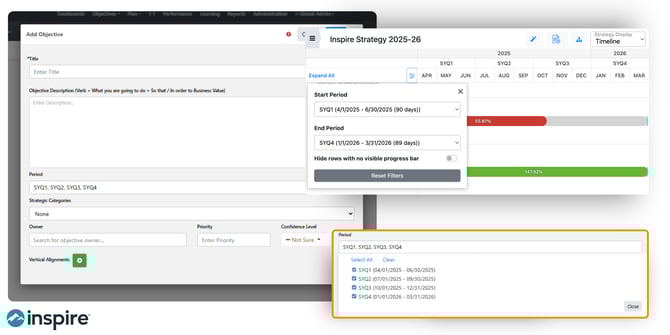
This release strengthens the foundation of long-term strategy execution by improving how corporate objectives are structured, aligned, and visualized.
- Added the ability for admins to set start and end dates for corporate objectives using configurable periods, ensuring alignment with long-term strategic timeframes.
- LTKR and CKR dates now default to and are constrained within their parent corporate objective's date range, preventing misalignment in the strategy timeline.
- Updated corporate objective progress calculations to better reflect long-term progress by averaging LTKRs and unrelated CKRs.
- Period filters in strategy views now apply to corporate objectives in addition to LTKRs and CKRs, providing more precise filtering across strategy boards, lists, and timelines.
- Completed the strategy timeline view with enhanced filtering and visualization capabilities.
- Added dedicated side panels for LTKRs and CKRs, replacing modals with a richer view of details, aligned items, and recent check-ins.
- Corporate objectives in the strategy narrative and alignment modals are now grouped and sorted by strategy category and priority for easier navigation.
- Numeric details are now enabled by default in the hierarchy view, reducing the need to manually toggle them on.
Objectives (Goals/OKRs): How to create, align, and manage OKRs faster with improved clarity and flexibility
Value: Teams can now move faster from idea to execution, with improved flexibility and clarity in how goals are defined and managed. This reduces setup time while improving alignment to broader strategic priorities.
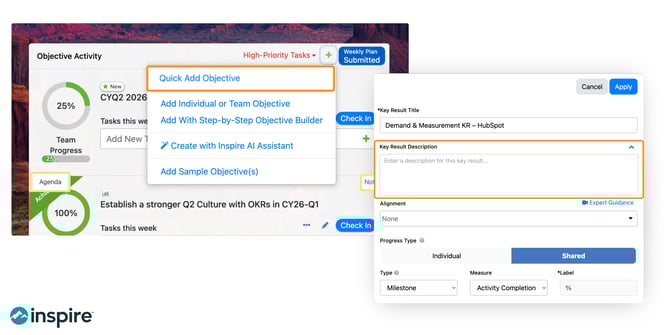
Enhancements to OKR creation and management streamline how teams define, align, and update goals—reducing friction and improving clarity.
- Introduced Quick Add Objective, allowing users to rapidly draft OKRs with a title, dates, and key results directly from the widget or objectives page.
- Key results now support an optional rich text description field, visible in the edit panel, objective side panel, and team details.
- Added the ability to edit key result titles directly in the KR edit panel alongside other fields.
- Improved the logic for assigning contributors to all key results so that existing multi-contributor KRs retain their progress type setting.
- Corporate objectives in the alignment modal are now grouped by strategy category for easier selection.
Objective Explorer: How to organize and scale OKR views with folders and structured navigation
Value: As organizations scale, these updates help maintain clarity and organization across complex goal structures, making it easier for teams to find, manage, and act on the views that matter most.
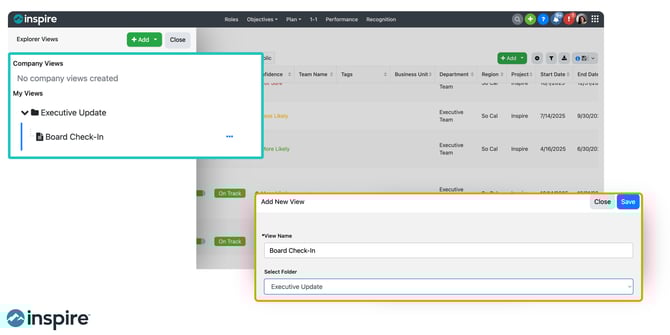
New organizational capabilities bring greater structure and scalability to how users navigate and manage OKR views.
- Added folder support to the Objective Explorer, allowing users to create, rename, and delete folders to organize views.
- Explorer views can now be moved into folders via a new Move option, with folders displayed alphabetically above ungrouped views.
- Folder management options (rename, delete) are available to view owners and admins, with views preserved if a folder is deleted.
Performance: How to improve performance workflows, appraisal accuracy, and alignment with strategy
Value: These improvements create a more streamlined and accurate performance workflow, helping leaders focus on meaningful evaluation and coaching—while ensuring performance data reflects true progress.
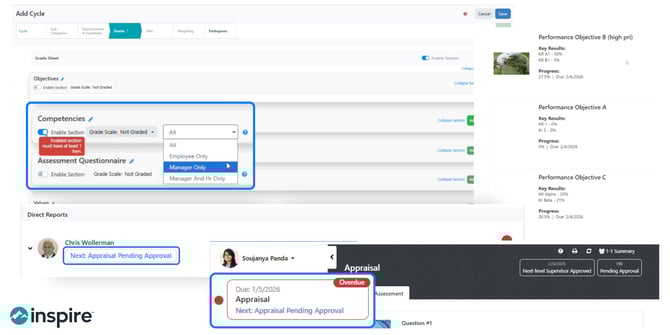
This release enhances the accuracy, clarity, and workflow of performance processes—ensuring better alignment between performance and strategy.
- Supervisors can now see a "Pending Approval" status on appraisals awaiting next-level supervisor or HR approval, visible in both the supervisor dashboard and direct report event views.
- The Prepare Appraisal action item is now automatically removed when an appraisal is pending approval and restored if rejected, reducing unnecessary action items for supervisors.
- Comment fields in performance events now display only for the responsible party based on section visibility settings (employee-only or supervisor-only).
- Overall scores in the Performance Summary Report are now excluded until the appraisal is submitted, preventing incomplete scores from appearing.
- Objective order in performance print views now matches the order displayed in events, sorted by priority then title.
1-1: How to connect 1-1 conversations directly to goals, key results, and performance context
Value: Managers and employees can now have more focused, context-rich conversations, directly connecting discussions to goals and outcomes.
Updates to 1-1 meetings improve clarity, context, and access to goal-related information during conversations.
- Agent-posted agendas in 1-1s now include supervisor/direct report labels so users can quickly identify which user’s agent generated the agenda.
- Replaced the info button in 1-1s with a "Key Results" button that opens the objective side panel for easier access to KR details.
Team Details: How to improve team collaboration, meeting preparation, and visibility into OKR progress
Value: Teams benefit from more structured, efficient collaboration, with improved tools to manage meetings, track progress, and maintain context over time.
Enhancements in Team Details improve collaboration, meeting preparation, and visibility into team progress.
- Admins can now create and manage agenda suggestions for team OKR meetings, with a dedicated section in Admin settings.
- Team OKR owners and contributors can now use admin-configured suggestions when building agendas in Team Details.
- Tasks in Team Details can now be edited and marked complete/incomplete directly from the Objective Progress tab.
- Rich text formatting is now preserved when viewing status updates in the Team History tab.
Newsfeed: How to filter and surface the most important updates, wins, and risks across teams
Value: Users can now quickly identify what matters most—wins, risks, and key initiatives—improving visibility and enabling faster, more informed decisions.
New filtering capabilities make it easier to surface relevant updates and insights across the organization.
- Added a Flag filter to the newsfeed, allowing users to filter check-ins by Win, Setback, or Initiative.
- Added the ability to filter the newsfeed by check-in type: Strategy, Objective, or Role check-ins.
- Newsfeed filters have been reorganized into a side panel with an Apply button.
Reports: How to access more timely, structured, and actionable insights across strategy and OKRs
Value: Leaders gain more timely, structured, and actionable insights, making it easier to monitor execution and identify trends across teams and strategy levels.
Reporting enhancements provide more timely access to insights and improved data organization.
- An in-app pop-up notification now appears when an offline report is ready for download, with a direct link to the report.
- Strategy-level check-ins (LTKR/CKR) are now included in the Check-in Summary Report, with proper grouping by team, business unit, or department.
- Check-ins in the Check-in Summary Report are now sorted by date (most recent first) within each grouping and flag type.
- Key results in the OKR Summary Report now display in the order set by the objective owner.
Additional Enhancements: More updates that improve flexibility, usability, and real-time execution workflows
Value: These enhancements provide greater flexibility, transparency, and real-time control, allowing users to adapt the platform to their workflows and access insights exactly when needed.
Additional improvements across the platform increase flexibility, usability, and real-time responsiveness.
- Users can now select an entire Planner plan to drive KR progress, with tasks dynamically updating as new items are added in Planner.
- Hovering over "X days ago" on conversation comments now displays the actual date and time the comment was posted.
- Expanded dashboard widget size options, now supporting sizes from 1x1 up to 20x20 for greater layout flexibility.
- Users can now run AI agents on demand from the Profile > Agents tab, including the Recognition, Plan, and 1-1 Agenda agents, without waiting for the next scheduled cadence.
Bringing It All Together: How Inspire Software 10.1 helps organizations connect strategy, goals, and performance into one system
Version 10.1 continues to advance Inspire Software’s core mission: helping organizations connect strategy, goals, and performance into a unified execution system.
With stronger alignment controls, improved visibility, and enhanced usability across the platform, this release enables teams to:
- Maintain alignment from long-term strategy to daily work
- Improve clarity and accountability across goals and performance
- Gain real-time insight into execution progress
- Operate with greater speed and confidence
Whether you’re refining your strategy execution approach or scaling it across the organization, these updates are designed to help you turn strategy into measurable results—more consistently and effectively.
If you missed our previous releases in 2025 or 2026 so far, here are links to the highlights:
10.0 Release: More flexible and efficient performance cycles, Stronger OKR collaboration, visibility, and control, Cleaner reporting and easier data access, Expanded survey capabilities for richer feedback, New AI assistance to support team OKR / goal execution
9.3 Release: AI Agents, Corporate Objective Privacy, Team Objective workflow, more
9.2 Release: Strategy List View, Strategy Department & Business Unit Filters, Explorer Enhancements, more
9.1 Release: Objective Tags, 1-1 Agenda Summaries & Conversations with Inspire AI, Customize Performance Cycles & Download Appraisals, more
9.0 Release: New Objective Explorer, Strategy Narrative updates, Public Objective Conversations, more